Free and Open Source ERP - ERP next

  Introduction What is an ERP system? And why should businesses use it? Today, small and medium-sized businesses (SMEs) also face some of the problems that large enterprises do. One of them being planning and managing their resources. SMEs face similar complexities but have limited resources to deal with them. Small businesses (like their bigger counterparts) have to: Do accounts to track their sales/purchases. Do their taxes. Pay their employees. Manage deliveries within promised timelines. Deliver quality goods and services. Communicate with customers, answer their queries. Large enterprises invest millions of dollars in highly sophisticated systems like SAP. SAP and similar systems are able to handle requirements from these large enterprises to bring their  multi-country ,  multi-company ,  multi-currency , global businesses into a single platform. This has helped them achieve consolidation of data/records in the fundamental processes such as accounting, taxation,...

SAP FI FISCAL YEAR VARIANT


Fiscal year variant contains the number of posting periods in a fiscal year and the number of special periods. You can define up to 16 posting periods in a fiscal year in the controlling component CO.

You need to specify the fiscal year variant for each company code. When you create a controlling area, you also need to specify the fiscal year variant.

The fiscal year variants of the company code and controlling area may only differ in the number of special periods used. You need to ensure that the fiscal year variants match. In other words, they may not have a time conflict.

How to create a Fiscal year variant?

Go to SPRO → SAP Reference IMG → Financial Accounting → Financial Accounting Global Setting → Fiscal Years → Maintain Fiscal year variant → Execute.
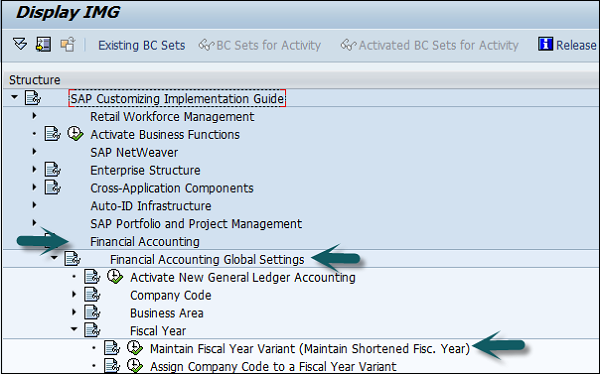
Create Fiscal Year Variant

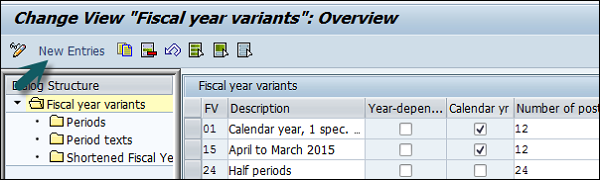
It will open the following window.

Fiscal Year Variant

Click New Entries and it will open a new window as shown below.
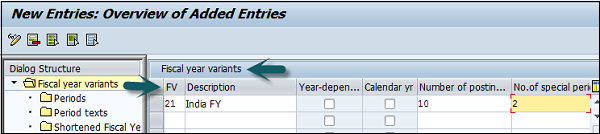
New Entries Fiscal Year Variant

Provide the following details −

  • FV − Enter 2-digit Fiscal year.

  • Description − Enter a description of the Fiscal year variant.

  • Year Dependent − If the start and the end date of the fiscal year changes between year, then check this box.

  • Calendar Year − If the fiscal year is same as the calendar year Jan-Dec, then check this option.

  • Number of Postings − Enter the number of posting periods for a Fiscal year.

  • Number of special postings − Enter the number of special posting periods for a fiscal year.

The next step is to save the details. Enter the customizing request number that a new fiscal year variant is created.
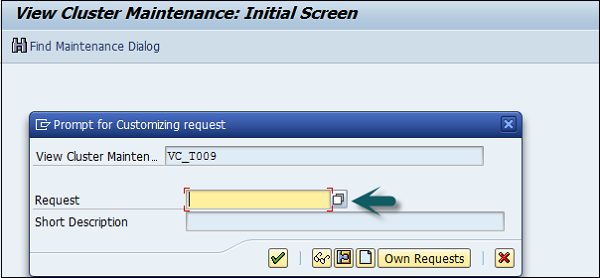
Enter Customizing Number

You can maintain the posting period by using the Period option under the Fiscal year variant.

Comments

Popular posts from this blog

SAP FI Journal Entry Posting

The use of Journal Entry (JE) posting in SAP FI is to take a batch, validate it for consistency, and create FI documents and post those entries in various line item accounts needed for subsequent business processing. JE Posting is a process that, with a few exceptions, runs "behind the scenes" and is the heart of Journal Entry. It receives journal entry data (representing financial transactions) from the PRA modules (Valuation, Revenue Distribution, etc.), and summarizes them in batches and posts them to the PRA JE line item tables and to SAP FI. Journal Entry Posting is the link between the journal entries coming from PRA applications and the FI documents and JE line item table items that are created. How to post a journal Entry in SAP FI? Use  T-code  FB50 → Provide the Company code. Enter the document date as shown below − The next step is to provide the following details − G/L Account  − Enter the account to be credited. Short Text  − Description of amount. Amoun...

SAP FI Posting period variant

SAP FI Posting period variant is used to maintain accounting periods that are open for posting and all closed period are balanced. This is used for opening and closing period in the fiscal year for posting purpose. You can assign these posting periods to one or more company codes. How to create posting period variants in SAP FI? Go to SPRO → SAP Reference IMG → Financial Accounting → Financial Accounting Global Setting → Document → Posting Periods → Define Variant for open Posting Periods → Execute. It will open a new window. Now, click New Entries. It will open another window, as shown below. Enter the 4-digit Posting Period Variant and name of the field. Click the Save icon to save this variant. Open and Close Posting Periods Go to SPRO → SAP Reference IMG → Financial Accounting → Financial Accounting Global Setting → Document → Posting Periods → Open and Close Posting Periods → Execute. Click the button New Entries, as shown in the following screenshot. Now, you need to provide the ...

SAP FI - Submodules

SAP FI has a collection of submodules, as depicted in the following screenshot − Finance Accounting - General Ledger A General Ledger contains all the transaction details of a company. It acts as the primary record to maintain all accounting details. Common general ledger entries are customer transactions, purchases from vendors, and internal company transactions. Common  T-codes  that are used to maintain G/L accounting − F-06 F-07 FBCJ FB50 FB02 Finance Accounting - Accounts Receivable and Payable (AR / AP) It includes the details of amount that is paid by the customer and the amount that is paid by company to the vendors. In other words, AP includes all the vendor transactions and AR includes all the customer transactions. Common SAP AR  T-codes  − FD11 FD10 FRCA VD01 Common SAP AR Tables − KNA1 KNVV BSIW Common SAP AP  T-codes  − XK01 MK01 MK02 FCHU Common SAP AP Tables − LFA1 LFM2 LFBK Finance Accounting Asset Accounting Asset Accounting deals with all...