Introduction What is an ERP system? And why should businesses use it? Today, small and medium-sized businesses (SMEs) also face some of the problems that large enterprises do. One of them being planning and managing their resources. SMEs face similar complexities but have limited resources to deal with them. Small businesses (like their bigger counterparts) have to: Do accounts to track their sales/purchases. Do their taxes. Pay their employees. Manage deliveries within promised timelines. Deliver quality goods and services. Communicate with customers, answer their queries. Large enterprises invest millions of dollars in highly sophisticated systems like SAP. SAP and similar systems are able to handle requirements from these large enterprises to bring their multi-country , multi-company , multi-currency , global businesses into a single platform. This has helped them achieve consolidation of data/records in the fundamental processes such as accounting, taxation,...
Function Areas in finance accounting are used to define the expenses in a company according to individual function units. The most common Functional Areas are −
- Manufacturing
- Sales and Distribution
- Production
- Administration
How to Define a Functional area in SAP FI?
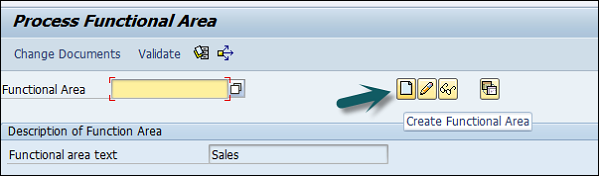
You can define a Functional Area using the T-code FM_FUNCTION (Earlier it was OKBD, but this is obsolete). It will open a new window.
Click on Create Functional Area as shown below and a new window will open.
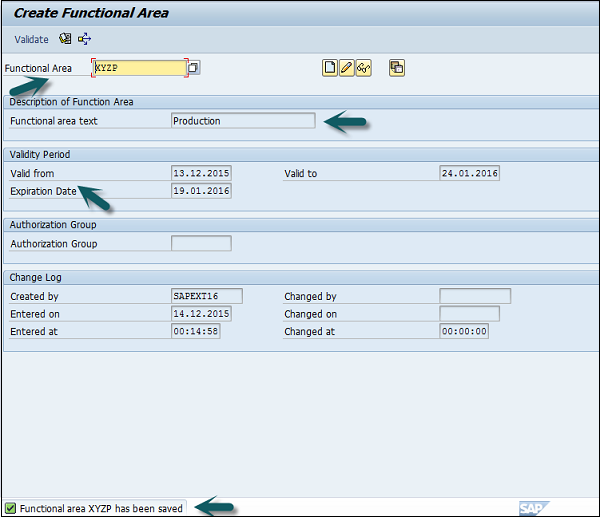
Enter the following details −
- Name of Functional Area.
- Description
- Validity to and from date
- Expiration date and Authorization.
Once all the details are provided, click the Save button at the top. Once you click Save, you will see a message at the bottom that a new functional area has been created.
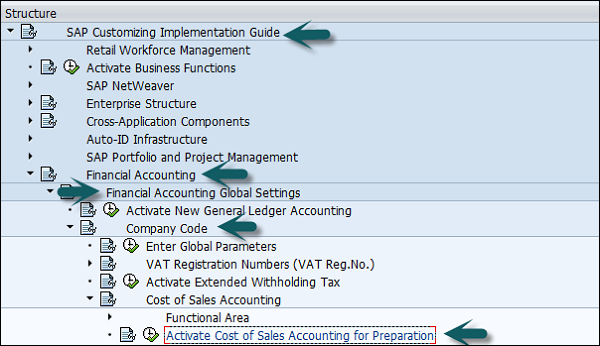
Functional Areas are used to create Profit and Loss statements using the cost of sales accounting and they are also used to analyze the cost of sales accounting. For this, you need to activate the cost of sales accounting as follows −
Go to SPRO → SAP Reference IMG → Financial Accounting → FI Global Settings → Company Code → Cost of Sales Accounting → Activate cost of sales accounting for preparation.
Comments
Post a Comment