Introduction What is an ERP system? And why should businesses use it? Today, small and medium-sized businesses (SMEs) also face some of the problems that large enterprises do. One of them being planning and managing their resources. SMEs face similar complexities but have limited resources to deal with them. Small businesses (like their bigger counterparts) have to: Do accounts to track their sales/purchases. Do their taxes. Pay their employees. Manage deliveries within promised timelines. Deliver quality goods and services. Communicate with customers, answer their queries. Large enterprises invest millions of dollars in highly sophisticated systems like SAP. SAP and similar systems are able to handle requirements from these large enterprises to bring their multi-country , multi-company , multi-currency , global businesses into a single platform. This has helped them achieve consolidation of data/records in the fundamental processes such as accounting, taxation,...
Credit Control in FI is used to check the credit limit for the customer and it can use one or more codes. It is used for credit management in Application components such as Account Receivable (AR) and Sales and Distribution.
The credit control area is determined in the following sequence −
- User exit
- Distribution channel
- Customer master
- Company code for the sales organization
How to define a Credit Control Area?
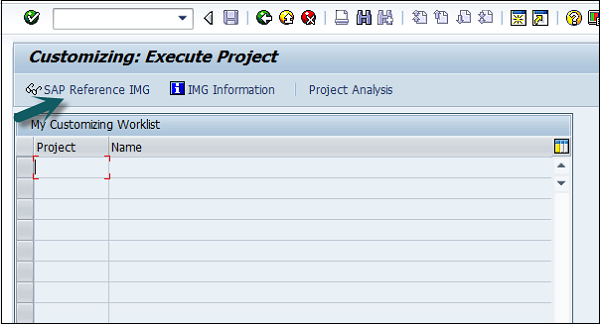
A Credit Control Area is defined in accordance with the areas of responsibility for credit monitoring. Use the T-code SPRO → click SAP Reference IMG. It will open a new window.
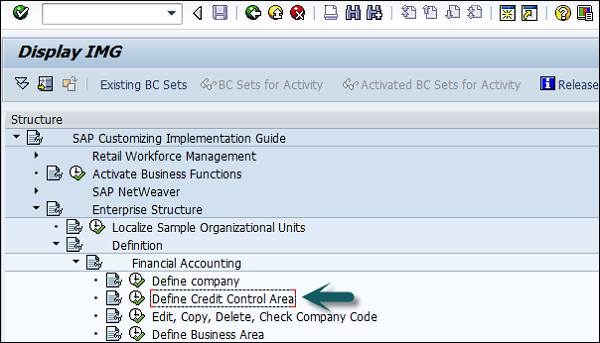
Expand SAP Customizing implementation guide → Enterprise Structure → Definition → Finance Accounting → Define Credit Control Area → Execute.
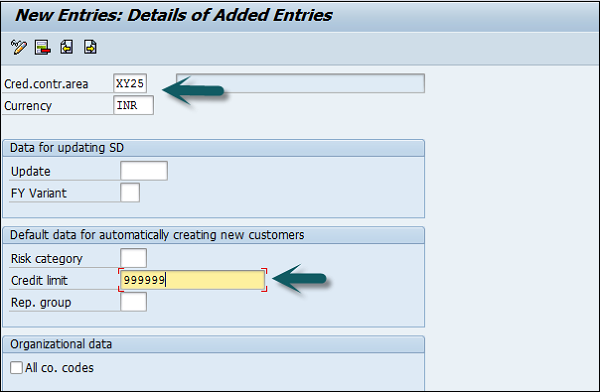
Click Execute → New entries → Enter the below details → Save. Now you have successfully configured the Credit Control Area.
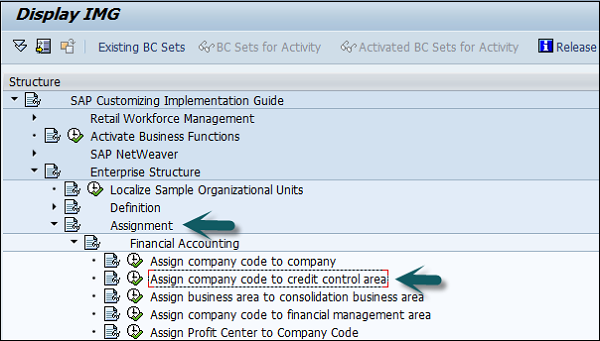
Once you create the Credit Control Area, the next step is to assign a company code to the credit control area.
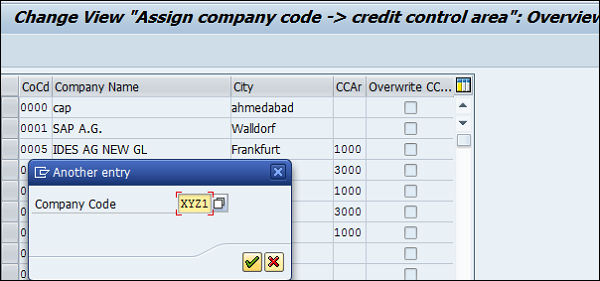
Expand Enterprise structure → Assignment → Finance Accounting → Assign company code to credit control area → Execute.
A new window will open → click Position → it will open another new window. Enter the company code and click Continue.
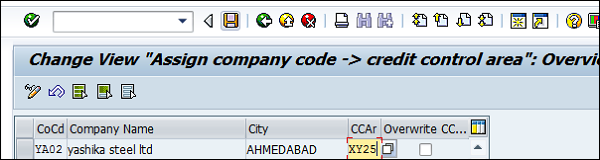
Enter the Credit Control Area in CCAR and save the details.
Comments
Post a Comment